botchallenge
React Immersive Code Challenge: Bot Battlr
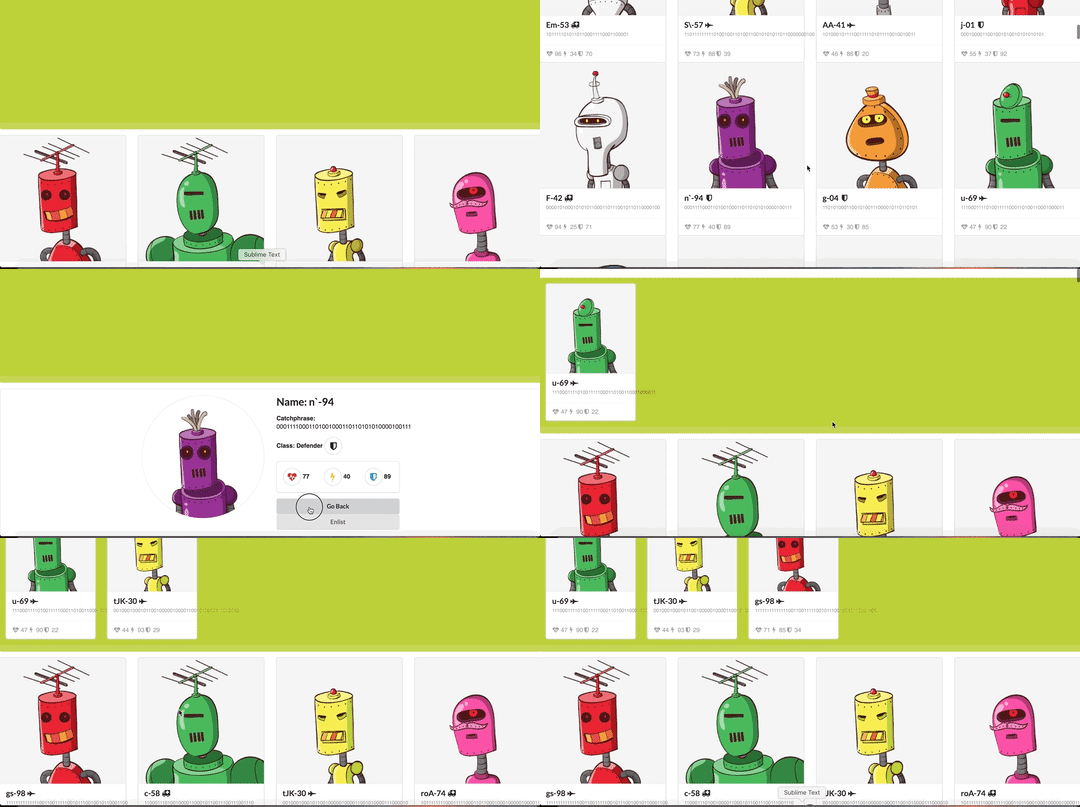
Welcome to Bot Battlr, the one and only spot in the known universe where you can custom build your own Bot Army! This is our app:

Here’s the scenario: a galactic overlord has hired you, a galactic web developer, to develop a galactic web app that will allow them to browse through a list of robots, view a robot’s details, and, enlist a bot into their army.
Instructions
For this project, you’ll be building out a React application that displays a list of available bots, among other features. Try your best to find the right places to insert code into the established code base.
Part of what this code challenge is testing is your ability to follow given instructions. While you will definitely have a significant amount of freedom in how you implement the features, be sure to carefully read the directions for setting up the application.
Setup
After unbundling the project:
- Run
npm installin your terminal. - Run
npm run server. This will run your backend on port8002. - In a new terminal, run
npm start. This will run your React app on port8000.
Make sure to open http://localhost:8002/bots in the browser to verify that your backend is working before you proceed!
The base URL for your backend is: http://localhost:8002
What You Already Have
BotPage is the highest component below App, and serves as the main container
for all of the pieces of the page.
BotCollection and YourBotArmy are container components, which are children
of BotPage. BotCollection is where all the bots will be displayed, while
YourBotArmy (the green portion on the top of the screen) will only display the
bots that have been selected by the user.
BotCard and BotSpecs are presentational components that have been provided
for you that will render out information about an individual bot formatted for a
list view and for a full view, respectively. They are pre-styled, and it is your
responsibility to get the data into them.
All of the code to style the page has been written for you, meaning that you should be adding to the code rather than editing it; however, if your finished product has some styling issues, don’t worry too much about it.
Core Deliverables
As a user, I should be able to:
- See profiles of all bots rendered in
BotCollection. - Add an individual bot to my army by clicking on it. The selected bot should
render in the
YourBotArmycomponent. The bot can be enlisted only once. The bot does not disappear from theBotCollection. - Release a bot from my army by clicking on it. The bot disappears from the
YourBotArmycomponent. - Discharge a bot from their service forever, by clicking the red button marked
“x”, which would delete the bot both from the backend and from the
YourBotArmyon the frontend.
Endpoints for Core Deliverables
GET /bots
Example Response:
[
  {
    "id": 101,
    "name": "wHz-93",
    "health": 94,
    "damage": 20,
    "armor": 63,
    "bot_class": "Support",
    "catchphrase": "1010010101001101100011000111101",
    "avatar_url": "https://robohash.org/nostrumrepellendustenetur.png?size=300x300&set=set1",
    "created_at": "2018-10-02T19:55:10.800Z",
    "updated_at": "2018-10-02T19:55:10.800Z"
  },
  {
    "id": 102,
    "name": "RyM-66",
    "health": 86,
    "damage": 36,
    "armor": 77,
    "bot_class": "Medic",
    "catchphrase": "0110011100000100011110100110011000011001",
    "avatar_url": "https://robohash.org/quidemconsequaturaut.png?size=300x300&set=set1",
    "created_at": "2018-10-02T19:55:10.827Z",
    "updated_at": "2018-10-02T19:55:10.827Z"
  }
]
DELETE /bots/:id
Example Response:
{}
Advanced Deliverables
These deliverables are not required to pass the code challenge, but if you have the extra time, or even after the code challenge, they are a great way to stretch your skills.
Note: If you are going to attempt these advanced deliverables, please be sure to have a working commit with all the Core Deliverables first!
As a user, I should be able to:
- Choose if I want to enlist a bot into my army or just see their data. Clicking
on the card should instead display a show view (
BotSpecs) for that bot, which should replaceBotsCollection. BotSpecs should have two buttons: one to go back to the list view and another to enlist that bot. Your app could look like the following:
- Sort bots by their health, damage or armor. For this, create a new component,
SortBar. - When I enlist a bot it will be removed from the
BotCollectionand added toYourBotArmy. - Filter bots by their class. We can select a few filters at the same time.
- Sort bots by their health, damage or armor. For this, create a new component,
SortBar. - Only enlist one bot from each
bot_class. The classes are["Support", "Medic", "Assault", "Defender", "Captain", "Witch"].